Every file you track, every commit you make, amongst other specific things, are snapshots that live in one place: git’s objects database.
In this post, we’ll discuss the general anatomy of Git objects, and how git it stores and reads them.
Git objects database
Whenever you track a file with ‘git’, it places it in the objects database, which is a directory you can find
under the following path .git/objects.
Furthermore, git is a content-addressable filesystem, which means that git acts as some sort of key-value store, where the key
is generated by git based on the actual content of the file, and the data is the content being saved + some related metadata.
The keys are basically SHA-1 hashes of the content being stored.
When does git write to the database
I actually learned that git saves the files in its database the moment you run git add, and not when you run git commit.
Say you want to save a file called name.txt at the root of your repository, whose content is simply the string Amrou.
echo "Amrou" > name.txt
git add name.txt
git status
This will result in the following output
On branch main
Changes to be committed:

  new file:   name.txt
What that means is, git has already saved that file for you in the objects directory.
So if you run ls .git/objects, you should be able to see a folder named b3, inside of which there’s a binary file
called b814480933d6b4e0a955fd39bb0b75e6719c84
The reason I know these hash values in advance is that given the exact same content, git will always generate the same hash.
It’s the founding principle of hashing functions.
The general object file structure
Once you’ve “added” a file, git stores it in binary format, but it does so following a specific structure that it can easily parse later.
Each file is divided into several blocks:
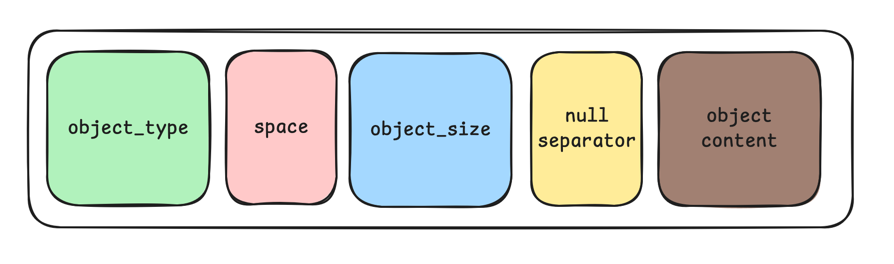
Let’s dive a bit deeper into the detail of each of these blocks:
object_type: The type of the object being stored, e.g. ablob, atree, acommit, etc.delimiter_space: The delimitergituses to know it has finished reading theobject_typeblock. Its value being the0x20hex, theASCIIvalue of the space character.object_size: The size of the content being saved, represented as an ASCII decimal.null_byte: The delimitergituses to know it has finished reading theobject_sizeblock. Its value being the0x00hex, the numerical value zero.object_content: The binary representation of the actual content that git is saving, of sizeobject_size.
Writing objects to the database
We’ve previously seen that git writes to its database when you run the git add command, but what does it actually do to write it?
1. Serializing the object into bytes
Each Git object will have a way that allows to serialize/deserialize it. This allows the conversion of raw bytes to an instance
of that Git object and vice versa.
We will look into the different ways git does this for each type of object, but for now, we can just assume that it has the following
structure:
import abc
from typing import Literal

OBJECT_TYPE = Literal[b"blob", b"commit", b"tree"]

class AbstractGitObject[T: OBJECT_TYPE](abc.ABC):

    def __init__(self, content: bytes):
        self.deserialize(content)

    @property
    @abc.abstractmethod
    def object_type(self) -> T:
        ...

    @abc.abstractmethod
    def deserialize(self, content: bytes) -> None:
        pass

    @abc.abstractmethod
    def serialize(self) -> bytes:
        ...
2. Assembling the data
Remember the structure we discussed earlier ? This step is about constructing data that follows it, which simply translates to something like the following:
from typing import Literal

object_instance: AbstractGitObject  #  We won't worry about where this comes from for now
object_type: Literal[b"commit", b"blob", b"tree"] = object_instance.object_type
object_content: bytes = object_instance.serialize()

git_object_file_content: bytes =  object_type + b" " + str(len(object_content)).encode() + b"\x00" + object_content
3. Making the hash
Once the file_content is ready, git simply hashes it like this:
import hashlib

sha_hash = hashlib.sha1(git_object_file_content).hexdigest()
Some important things to note here:
- Because the hash is derived from content, two identical files always produce the same key/hash, and
gitstores them as the same file even if those files would have different names. - Changing a file’s content on the filesystem produces a new file in the
gitobjects database. - Git never modifies an existing object; it only creates new ones.
4. Compressing the content
In order to save space on disk, git compresses the content before it writes it to a file
import zlib

compressed_content: bytes = zlib.compress(git_object_file_content)
5. Writing it all to disk
Now that we have the sha1 hash and the compressed content, git uses those 2 components to write it on disk
Note:
gituses the first 2 characters of theshaas the folder where it will write the data, we will discuss this more in detail in another post
import os

directory_name = sha_hash[0:2]
file_name = sha_hash[2:]

file_path = os.path.join(path_to_git_directory, directory_name, file_name)

with open(file_path, "wb") as f:
    f.write(compressed_content)
6. The full picture
This is just all the previously discussed steps assembled together to have a clearer idea how these steps connect together
Note: This is all just a high-level overview of what happens, some checks and steps are omitted for simplicity
import abc
from typing import Literal
import hashlib
import zlib
import os


# AbstractGitObject is defined in Step 1, refer to it for the interface's details

def write_git_object(object_instance: AbstractGitObject, path_to_git_directory: str):

    object_type: Literal[b"commit", b"blob", b"tree"] = object_instance.object_type
    object_content: bytes = object_instance.serialize()

    git_object_file_content: bytes =  object_type + b" " + str(len(object_content)).encode() + b"\x00" + object_content

    sha_hash = hashlib.sha1(git_object_file_content).hexdigest()

    compressed_content: bytes = zlib.compress(git_object_file_content)

    directory_name = sha_hash[0:2]
    file_name = sha_hash[2:]

    file_path = os.path.join(path_to_git_directory, directory_name, file_name)

    with open(file_path, "wb") as f:
        f.write(compressed_content)
And that’s it, everything we’ve just demonstrated so far is basically what the hash-object command does with the -w option.
Reading objects from the database
Now that we know how to save content with git, it’s time to find out how git reads that content.
The way data is deserialized depends on the type of the object, but that’s something we’ll implement and discuss more in details in this series.
Before diving into the steps, let’s just suppose we have this:
class Commit(AbstractGitObject[Literal[b"commit"]]):

    @property
    def object_type(self) -> Literal[b"commit"]:
        return b"commit"

class Tree(AbstractGitObject[Literal[b"tree"]]):

    @property
    def object_type(self) -> Literal[b"tree"]:
        return b"tree"

class Blob(AbstractGitObject[Literal[b"blob"]]):

    @property
    def object_type(self) -> Literal[b"blob"]:
        return b"blob"
1. Reading the file from the hash
path_to_git_directory: str  # This is information provided from the outside
sha_hash: str  # This is provided by the user at some point
directory_name = sha_hash[0:2]
file_name = sha_hash[2:]

object_file_path = os.path.join(path_to_git_directory, directory_name, file_name)


with open(object_file_path, "rb") as f:
    compressed_content: bytes = f.read()
2. Decompressing the content
We’ve seen that git compressed the content before writing it to save disk space, so that operation must be reversed
decompressed_git_object_content: bytes = zlib.decompress(compressed_content)
3. Read the object type
We’ve seen that git uses a space character to delimit the object type from its length, so we use that to know how many
bytes to read in order to determine the content
space_delimiter_position = decompressed_git_object_content.find(b" ")
object_type: bytes = decompressed_git_object_content[0:space_delimiter_position]
4. Read the object size
Same thing here, git uses the null byte to delimit the object’s size from its content, so we use that to determine the
number of bytes to read that contain the size info
null_byte_position = decompressed_git_object_content.find(b"\x00", space_delimiter_position)
size = int(decompressed_git_object_content[space_delimiter_position+1:null_byte_position].decode("ascii"))
Note: We’re using
space_delimiter_position + 1here to not include the space byte
5. Read the object content
We’ve read the metadata, all that’s left now is read the content
content: bytes = decompressed_git_object_content[null_byte_position+1:]
Note: We’re using
null_byte_position + 1here to not include the null byte
6. Construct the git object instance
match object_type:
    case b"commit": target_class = Commit
    case b"blob": target_class = Blob
    case b"tree": target_class = Tree
    case _:
        raise ValueError("Unknown object type")

object_instance: AbstractGitObject = target_class(content)
7. The full picture
This is just all the previously discussed steps assembled together to have a clearer idea how these steps connect together
def read_object(sha_hash: str, path_to_git_directory: str) -> AbstractGitObject:
    directory_name = sha_hash[0:2]
    file_name = sha_hash[2:]

    object_file_path = os.path.join(path_to_git_directory, directory_name, file_name)

    with open(object_file_path, "rb") as f:
        compressed_content: bytes = f.read()

    decompressed_git_object_content: bytes = zlib.decompress(compressed_content)

    space_delimiter_position = decompressed_git_object_content.find(b" ")
    object_type: bytes = decompressed_git_object_content[0:space_delimiter_position]

    null_byte_position = decompressed_git_object_content.find(b"\x00", space_delimiter_position)

    size = int(decompressed_git_object_content[space_delimiter_position+1:null_byte_position].decode("ascii"))

    if size != len(decompressed_git_object_content) - null_byte_position - 1:
        raise ValueError(f"Object {sha_hash} is malformed: content length mismatch")

    content: bytes = decompressed_git_object_content[null_byte_position+1:]
    match object_type:
        case b"commit": target_class = Commit
        case b"blob": target_class = Blob
        case b"tree": target_class = Tree
        case _:
            raise ValueError("Unknown object type")

    return target_class(content)
As you might have noticed, both the serialize and deserialize methods were left unimplemented in this article.
That has been done on purpose because each one plays a fundamental role in writing and reading a git object.
We’ll explore the different implementations based on the object types in later parts of the git series