During our RabbitMQ v4.x migration preparation, we started seeing exceptions we couldn’t make sense of, which eventually started bringing down our services.
One of the steps I mentioned in our RabbitMQ v4.x migration was to
transfer messages between queues in different vhosts, and
that meant reading from queue1 in vhost1 and copying those messages to queue2 in vhost2.
We rolled this out environment by environment, and it went smoothly for the first few, until one day Sentry lit up with:
TypeError: unsupported operand type(s) for +: 'float' and 'str'
Digging into the stack trace, the crash was happening deep inside Billiard, one of Celery’s core libraries, at this line:
if monotonic() >= start + timeout:
    ...
start was a perfectly valid float. timeout, on the other hand, was ,. Just a comma, when it was supposed to be a float/int as well.
Sentry Snippet
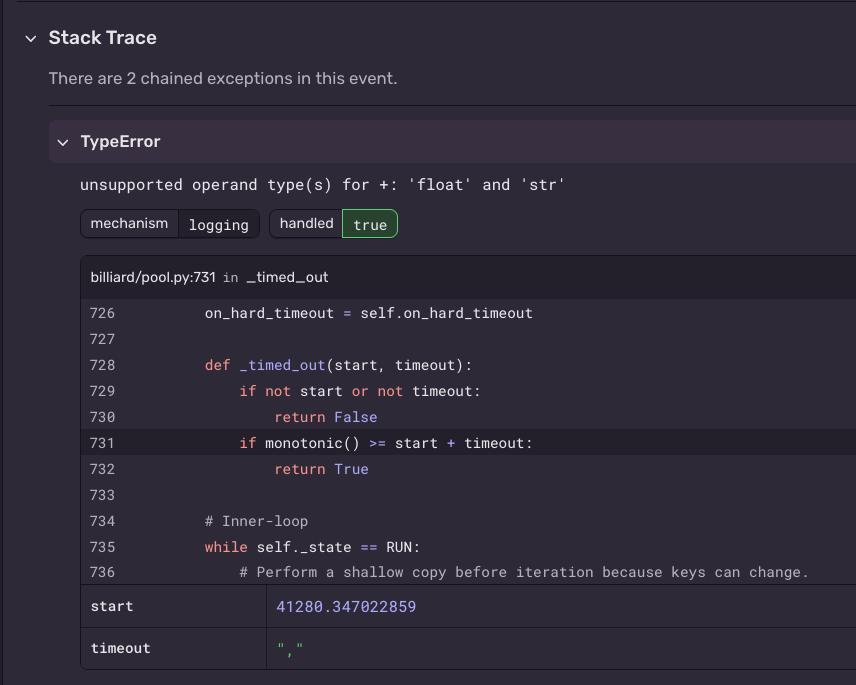
Where did a comma come from? The answer is buried in how RabbitMQ encodes values on the wire, and specifically, in a disagreement between two Python libraries about what a single byte means.
Strap in.
AMQP frames
RabbitMQ speaks AMQP, which is a protocol that handles everything from publishing messages to consuming them.
AMQP runs over TCP but doesn’t just pour raw bytes down the pipe. It wraps everything in frames: structured envelopes that each carry a type, a channel number, and a payload. The type tells the receiver what kind of data it’s looking at.
If you want the full picture, the official protocol spec has it all. Brian’s article on AMQP’s frame structure is a much quicker read if you’d rather not wade through a technical PDF.
The headers property
When you publish a message, one of the frames contains what AMQP calls “properties”: metadata about the message like content-type, content-encoding, and so on. Think of it as HTTP headers but for your queue.
One of those properties is headers, which lets you attach arbitrary key-value pairs to a message.
In AMQP terms, that structure is called a Field Table, which is really just a binary encoding of a dictionary.
Field table encoding
This is the part that actually matters, so it’s worth slowing down here.
Each entry in a field table is packed as four consecutive pieces:
- Key length — 1 byte telling you how many bytes the key name occupies
- Key name — N bytes (where N came from the previous byte)
- Type tag — 1 byte identifying what kind of value follows
- Value — M bytes, where M is determined entirely by the type tag
That type tag is the crux of everything. AMQP defines a fixed set of value types such as: short int, long string, boolean, decimal, etc, and each one has a single-byte identifier. The decoder reads the tag first, then knows exactly how many bytes to consume for the value.
Section 4.2.1 of the spec lists all of them.
If you want more details of how the decoding happens, you can dive into the following section that contains a step-by-step explained example
Field table entry Example
Let’s suppose we want to send {"amount": 300} as the headers property.
In AMQP, the dictionary itself is called a field-table, and each key-value pair inside it is a field-value pair.
So for the amount=300 field-value pair, the byte sequence in the frame is:
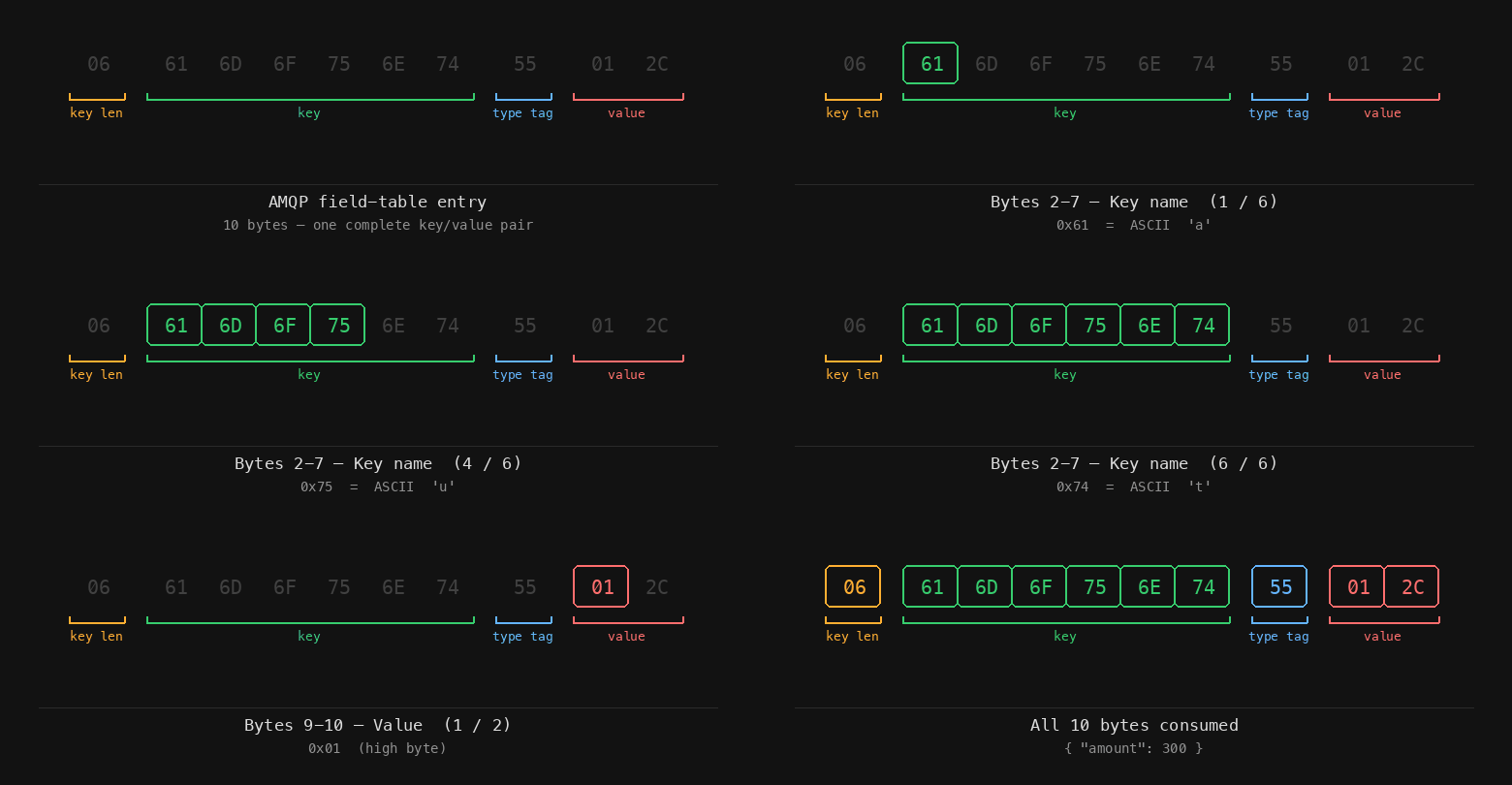
06 61 6D 6F 75 6E 74 55 01 2C
Let’s go over how this gets interpreted, step-by-step:
First, it reads 06, which tells it that the key of this entry has a length of 6 bytes.
This leads it to reading 6 bytes to get the key name, those 6 bytes being: 61 6D 6F 75 6E 74.
These are the hexadecimal ASCII characters that decode to amount.
Next, it reads the type tag to determine the value that comes with the amount key.
Type tags are always 1 byte. Here, that byte is 55.
55 in hexadecimal corresponds to the ASCII character U, which means the value is a Short Int.
Short Ints are always 2 bytes, so AMQP reads the next 2: 01 2C, which evaluates to 300.
Why a Short Int and not something smaller? A Short Short Int (signed, 1 byte) has a max value of 127. 300 exceeds that, so the next type up is a Short Int, which uses 2 bytes.
Here’s an animation of how the decoding happens:
The discrepancy in codec
To transfer the messages, we used aio-pika to read from the source queue, tweak the headers and republish to the destination.
aio-pika delegates wire encoding to pamqp, and pamqp uses s as the type tag for 16-bit signed integers.
Celery, on the other hand, uses Kombu at the transport layer, which uses py-amqp for encoding and decoding.
Here’s the problem: pamqp and py-amqp disagree on what the s type tag means. That single-byte disagreement is where everything falls apart.
Suppose we want to send the following headers over the wire {"some-key": 300}, so by the time we’d want to encode the 300 value,
the following happens:
pamqpsends the following73 01 2Cbyte sequence over the wire:- The type tag byte is
73(hex), which is the ASCII charactersthat stands for a signed 16-bit integer in pamqp’s convention - Since it’s a 16-bit integer,
300is encoded over the next 2 bytes:01 2C
- The type tag byte is
py-amqpreceives the same73 01 2Cbyte sequence:- The type tag byte is
73, ASCII characters, however this time, in py-amqp’s convention,smeans short string - For a short string, the next byte is the string length:
01= 1 character - It then reads 1 byte for the content:
2C, which is the ASCII character,
- The type tag byte is
That’s exactly what happened to us. The headers on our messages included a timelimit key with the value [None, 300] where None was the soft timeout and300 was the hard timeout in seconds.
pamqp encoded 300 with the s tag. When py-amqp decoded it, it read s as “short string”, consumed \x01 as the length (1 character), then read \x2c as the content which is ASCII for ,.
So timeout became ,, and Billiard blew up trying to do float + str.
Why does this discrepancy exist?
The obvious question is: who’s doing it wrong?
The answer is frustratingly: it depends on which spec you follow, and the specs contradict each other.
AMQP 0-9-1 introduced a set of field table type tags, but RabbitMQ (and Qpid before it) had already shipped their own extensions using the same byte values with different meanings. The two conventions conflict.
The RabbitMQ errata page documents this conflict explicitly. Here’s the relevant part of the type tag table:
| Tag | 0-9-1 spec | Qpid / RabbitMQ |
|---|---|---|
s | short string | signed 16-bit |
U | signed 16-bit | — |
S | long string | long string |
Worth noting: the original 0-9 spec didn’t define s or U at all; it only had S, I, D, T, F, V. Both tags were introduced in 0-9-1, but Qpid and RabbitMQ were already shipping their own extensions that reused the same byte values differently.
The errata puts it plainly:
In Qpid and Rabbit,
smeans a signed 16-bit integer; in 0-9-1, it means a short string.
And then:
RabbitMQ continues to use the tags in the third column.
So RabbitMQ’s broker uses s for signed 16-bit. pamqp deliberately follows this as stated in its v1.5.0 changelog. It explicitly says it aligned field table type indicators to the RabbitMQ protocol errata.
But when it came for py-amqp, it went the other way and followed the 0-9-1 spec where s would stand for a short string and U for a signed 16-bit, with no mention of the conflict anywhere in its codebase.
Neither library is being reckless. They each picked a side of a genuine spec conflict. The problem is they disagree on the one tag that affected our timelimit value, and the disagreement produces no error — just silently wrong data.
How we solved this
We swapped aio-pika out for pika to do the message transfer. pika has its own wire encoder and uses the U type tag for 16-bit integers, aligning with the same convention py-amqp expects on the receiving end, so the two sides finally agreed. Problem solved for new messages.
The already-corrupt messages in the queues needed a different approach:
- Set a delivery limit policy in RabbitMQ
- When messages hit that delivery limit, route them to a dead letter queue
- Write a script to read from those DLQs, check the
timelimitheader, and fix the value from[None, ',']to[None, 300] - Redrive those messages back to the original destination queue
While debugging this, I would have loved to find something that connected all the pieces, except that I didn’t.
And that’s what has pushed me to write this article, so that the next person who ends up staring at a comma that should’ve been an integer for a timeout value would know where it came from.